
Ai Chat & Video-Roleplay
BAKA LIMITEDTools
3.912.00 Reviews
- Version
- 11.1
- Installs
- 100.00K
- Age Rating
- Mature 17+
Screenshots




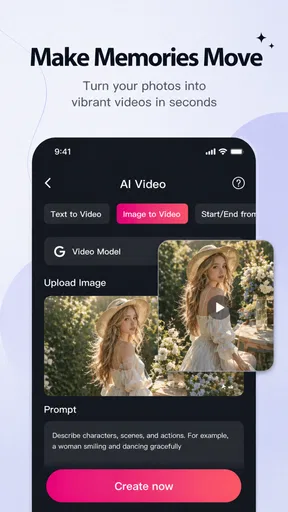
Our Review of Ai Chat & Video-Roleplay
 Analysis by Appyee
I approached Ai Chat & Video-Roleplay as a conversational tool rather than a traditional video editor or a full social platform. Its central idea is simple: you interact with an AI through chat and role-play-oriented video experiences, with the service designed around an always-connected session. That makes it appealing when I want an immediate exchange instead of a complicated setup, but it also means the quality of the experience depends heavily on connection, clear prompts, and sensible expectations.
The app is listed in the Tools category and comes from BAKA LIMITED. It is free to install, although purchases inside the app range from $0.99 to $99.99 per item. That combination matters: I can try the basic experience without paying upfront, but I would still treat every optional purchase carefully until I understand what the app offers in my particular session.
Its store positioning emphasizes listening, understanding, and responding, while the short description reduces the idea to AI chat. In practice, I found that the most useful way to judge it is not by expecting a human conversation, but by seeing how well it handles a defined scenario. A focused request, a clear role, and one task at a time generally make a better starting point than an open-ended attempt to make the app do everything at once.
Getting past the first points of friction
I find it helps to treat the first session as a small, low-stakes trial rather than a test the app has to pass all at once. I’d choose one clear task and notice which parts of the interaction feel comfortable to read and manage, then consider how the next section’s practical adjustments might make that experience easier to shape.
Why the first conversation may feel less smooth than expected
The biggest adjustment is accepting that an always-online AI tool is not like a notes app or an offline utility. If the connection is unstable, the response can feel delayed or incomplete, and it may be tempting to blame the conversation itself. I would first separate those two issues. A slow exchange does not automatically mean the AI misunderstood the request, and a weak answer does not necessarily mean the application failed to load correctly.
I recommend beginning with a short, specific message. Instead of sending a long explanation containing several goals, I would state the role, the situation, and the desired response style separately. For example, I might ask the AI to act as a travel-planning companion, then explain that I need a concise comparison, and only afterward add the details of the trip. This gives me a cleaner way to see whether the problem is the prompt or the connection.
Video-roleplay adds another layer of expectation. I would not approach it as a replacement for professional video production, nor assume that every exchange will behave like a conventional recorded clip. The useful question is whether the role-play helps me explore an idea, rehearse a conversation, or enjoy an interactive scenario. If I need precise editing, fixed timing, or dependable export control, a dedicated video tool is likely a better fit.
Simple checks before changing anything
Before reinstalling or making a purchase, I would check the basics. The app requires Android 7.0 or later, so an older device may be the first obstacle. On a compatible phone, I would confirm that the operating system is current enough for the device, close other demanding applications, and retry the same short prompt. Repeating one controlled test is more useful than changing several things at once.
I would also pay attention to whether the issue affects every conversation or only one session. If a fresh, simple exchange works but a long role-play becomes unreliable, the difficulty may come from the amount of context being handled rather than from installation. In that situation, I would divide the scenario into smaller turns and restate the important details when needed.
Because the app is designed for connected use, I would test it on a stable Wi-Fi connection and then, if appropriate, on mobile data. The goal is not to assume that one network is always better, but to identify whether the behavior follows the connection. If responses improve immediately after switching networks, that is useful evidence before I touch account settings or spend money.
The mature age classification is also worth taking seriously. I would not treat the app as something to hand to a child simply because the installation itself is free. The role-play angle can lead conversations in directions that are not suitable for younger users, so the intended audience should be an adult who is comfortable managing the content and deciding what kind of interaction is appropriate.
A setup routine that saves time
My preferred starting routine is deliberately boring. I open the app with a stable connection, begin with a short request, and avoid evaluating the entire service from one unusually complicated prompt. I then try a second message that refers to the first. This gives me a quick sense of whether the conversation maintains context well enough for the way I intend to use it.
I would also decide in advance whether I am testing chat, role-play, or video-oriented interaction. Mixing all three immediately makes it difficult to identify what is working. A better sequence is to establish a normal text exchange first, then introduce a character or scenario, and only afterward explore the video-roleplay side. This is one of the more practical ways to reduce confusion during the first session.
When an app includes optional purchases, I prefer to explore the free experience before committing. The price range for individual in-app items is broad, so I would read each purchase screen carefully and avoid assuming that a payment is a subscription, a permanent unlock, or a guarantee of better responses. I would make the decision based on the exact wording shown at the moment of purchase, not on what I hope the item will provide.
Recovering a conversation that has gone off track
When the AI gives an irrelevant response, my first recovery step is not to repeat the same sentence louder or longer. I briefly correct the role and task: explain what it misunderstood, state the intended direction, and ask for one specific next response. This works better than adding several new instructions, because a crowded correction can create another layer of ambiguity.
If the session still feels confused, I would start a clean conversation rather than carrying every previous mistake forward. Before doing that, I would copy the essential setup into a short note: who the AI is meant to portray, what I am trying to achieve, and any boundaries for the exchange. That small preparation makes restarting much less frustrating and gives me a consistent test between sessions.
A useful workflow for role-play is to keep the scenario modular. I might first establish the setting, then ask for the character’s response, and then decide whether the next turn should move the scene forward. This gives me more control than writing an entire script in one message. It also makes it easier to stop when the tone changes or the output no longer matches what I intended.
For video-oriented use, I would save the wording of a prompt that works well before experimenting with variations. If a later attempt produces a weaker result, I can return to the earlier version and change only one element. That is a simple troubleshooting habit, but it is especially useful in creative AI tools where several small changes can affect the result at once.
Recognizing problems outside the app
Not every failure belongs to the application. A phone with very little free storage, an overloaded background workload, or an unreliable network can make an online tool appear broken. I would close unused apps, restart the device if normal behavior has changed across several applications, and check whether other online services are also struggling. These are ordinary checks, but they prevent unnecessary reinstalls.
There is another important distinction: an AI can respond successfully and still produce an answer I dislike. That is a quality issue, not necessarily a technical error. If the response is coherent but too vague, I would improve the instruction. If the app does not respond at all across repeated simple tests, I would treat that differently and focus on connection, compatibility, or the current session.
The same applies to role-play expectations. If I need exact factual guidance, I would verify important information elsewhere rather than treating an AI character as an authority. If I need a polished commercial video, a timeline editor with predictable controls is more appropriate. Ai Chat & Video-Roleplay is more interesting as an interactive companion and creative prompt space than as a precision instrument.
Where it fits better than familiar alternatives
Compared with a standard chatbot, the role-play framing can make an exchange feel more directed and imaginative. I can approach a scenario as a rehearsal, a fictional conversation, or a way to explore different responses. That is more engaging than a blank text box for users who think in scenes and characters. The trade-off is that the framing may be less useful when I only want a fast, neutral answer.
Compared with a conventional video editor, this app removes much of the manual work but also gives me less predictable control. A video editor is better for trimming clips, arranging a timeline, placing exact transitions, or preparing a finished piece. Here, the appeal is the interaction itself. I would choose this app for experimentation and conversation, not for a workflow where every visual detail must remain fixed.
Compared with ordinary messaging, the app offers an AI-centered exchange rather than a dependable human reply. That makes it available whenever I want to test an idea, but it also means I should not confuse responsiveness with understanding, memory, or personal judgment. I find it most valuable when I use it as a tool for brainstorming, rehearsal, and entertainment rather than as a substitute for a trusted person.
Who will get the most from it
I think the strongest audience is adults who enjoy conversational experiments and want a low-barrier way to try AI role-play. Someone writing a scene, practicing how to approach a difficult discussion, or looking for an interactive creative prompt may find the format more inviting than a conventional productivity app. The free entry point makes it reasonable to test that fit before considering any optional purchase.
A realistic everyday use would be preparing for a conversation at work. I could ask the AI to play a skeptical colleague, present my proposal in a few sentences, and then practice answering objections. I would not treat its feedback as a perfect prediction of the real person, but the exercise could help me notice weak explanations or rehearse a calmer response. The value comes from repeating the scenario and changing my approach, not from accepting one answer as definitive.
It may also suit someone who wants to turn a writing prompt into a back-and-forth scene. I would set a narrow premise, let the AI respond, and use the exchange to discover dialogue possibilities. The limitation is that creative momentum can be interrupted by inconsistent tone or an answer that moves the scene somewhere unwanted. Keeping prompts focused and restarting when necessary makes this use much more enjoyable.
Who should choose another tool
I would skip it if my main goal is offline access, exact video editing, or a guaranteed factual reference. The always-online design is a poor match for unreliable connectivity, and the conversational format is not a replacement for specialist software. I would also be cautious if I dislike experimenting with prompts, because getting the best result often requires some adjustment rather than a single perfect command.
Users who are especially sensitive to unexpected mature themes should pay attention to the age classification and avoid treating the app as a general family utility. Likewise, anyone uncomfortable with optional purchases should review the payment flow carefully and stay within the free experience until the value is clear. The broad in-app purchase range makes deliberate decision-making more important than impulse testing.
My practical verdict after using it
Ai Chat & Video-Roleplay is an interesting free tool for adults who want interactive AI conversation with a role-play and video-oriented angle. I like the immediacy of starting with a scenario instead of building a project from scratch, and I can see genuine value in rehearsing conversations or developing creative ideas. Its best moments come when I give it a defined role, a manageable task, and room to respond one step at a time.
My reservations are just as clear. The online requirement makes connection quality part of the experience, AI output still needs judgment, and the role-play format will not satisfy people looking for professional video controls or purely factual assistance. I would also avoid paying until I had tested the free path and understood exactly what an optional item provides.
The app currently shows a 3.9 average from over one hundred ratings, with more than one hundred thousand installs, so there is enough public interest to make trying it reasonable while keeping expectations grounded. It is offered free, carries a Mature 17+ classification, and its current release is version 11.1. For my purposes, those details point to a product worth sampling rather than blindly committing to.
My recommendation is to treat it as a guided creative conversation tool, not an all-purpose assistant. Start with a short test, check the connection, build one scenario at a time, and separate technical problems from answers you simply do not like. If that workflow suits you, the app can be a playful and occasionally useful addition to an Android device running version 7.0 or later. If you need dependable offline work, controlled editing, or authoritative information, I would choose a more specialized alternative instead.
Verdict
Strengths of Ai Chat & Video-Roleplay
- Supports immersive conversations with customizable AI characters.
- Video roleplay adds a more engaging visual dimension to chats.
- Offers creative scenarios for entertainment and storytelling.
- Easy-to-use interface makes starting a roleplay session simple.
- Useful for practicing dialogue and exploring different personalities.
Limitations of Ai Chat & Video-Roleplay
- Some advanced features may require a paid subscription.
- AI responses can occasionally feel repetitive or inconsistent.
- Video features may consume significant mobile data and battery.
- Privacy policies should be reviewed before sharing personal information.
- Quality can vary depending on the selected character or scenario.
Similar Picks in This Category
View All
Google LLC4.0

Gboard - the Google Keyboard
Google LLC4.5

Google Play services
Google LLC4.3

Google Play Store
Google LLC4.9

Files by Google
Google LLC4.5

SHAREit: Transfer, Share Files
Smart Media4U Technology Pte.Ltd.4.3
Frequently Asked Questions
What is Ai Chat & Video-Roleplay, and what can I do with it?
Ai Chat & Video-Roleplay is an entertainment app designed for interactive conversations and video-style roleplay with artificial intelligence characters. After installing it, users can select or create scenarios, chat with virtual personalities, and explore different conversational styles. The experience is intended to feel immersive and spontaneous, although responses are generated by AI and may sometimes be repetitive, inaccurate, or inconsistent with the selected character.
Does Ai Chat & Video-Roleplay require an account or an internet connection?
The app may require users to create an account or sign in before accessing its main chat and roleplay features. An active internet connection is generally necessary because conversations and AI responses are processed online. This means the application may not work properly in airplane mode or with unstable connectivity. Before downloading, users should also check whether sign-up options, regional availability, or platform requirements have changed.
Is Ai Chat & Video-Roleplay free to download and use?
Ai Chat & Video-Roleplay may be available as a free download, but some features can be restricted behind in-app purchases, subscriptions, credits, or usage limits. Premium access may unlock additional characters, longer conversations, video-related functions, or faster responses. We recommend reviewing the pricing page carefully before starting a trial, since subscriptions can renew automatically unless they are canceled through the relevant Android or iOS account settings.
Is the content in Ai Chat & Video-Roleplay suitable for children?
Parents should review the app’s age rating and content policies before allowing children to use Ai Chat & Video-Roleplay. AI roleplay apps can include mature themes, suggestive conversations, user-generated scenarios, or unpredictable responses, depending on the available characters and prompts. Even when moderation tools are provided, they may not block every unsuitable interaction. Parental supervision and device-level restrictions are recommended for younger users.
How private are my conversations and videos in Ai Chat & Video-Roleplay?
Before using the app extensively, read its privacy policy to understand how messages, prompts, account details, uploaded media, and generated content are handled. AI services may store conversations temporarily or use certain data to operate, moderate, or improve their systems. Avoid sharing passwords, financial information, precise personal details, or private images. Also check the app’s permissions and disable access to the camera, microphone, or storage when those features are not needed.
